Compare
 vs
vs
Goodnotes vs Notability
The classic iPad question, honestly answered: Goodnotes wins on notebook organization and flexible pricing, Notability on audio recording synced to your writing. But if you're a student, both leave the bigger question open — your beautiful handwritten notes just sit there. Mento's notebook feeds spaced repetition: the notes become cards, the cards get scheduled, and exam day gets rehearsed.
Updated September 2026
The short answer
Which one is right for you?
Choose Mento if…
- ✓Your handwritten notes exist to be remembered, not just archived
- ✓You want typed notes, PDFs and ink in one library with real search
- ✓You want flashcards, spaced repetition and practice tests built in
- ✓You work across web, iPhone and Android, not just Apple
Choose Goodnotes if…
- ✓Pen feel and paper templates are the whole point for you
- ✓You want notebook organization at its best — binders, covers, outlines
- ✓You want a one-time purchase option on Apple devices
Choose Notability if…
- ✓Recording lectures with audio synced to your writing is your workflow
- ✓You replay what the professor said at the exact stroke you wrote
- ✓You live fully inside the Apple ecosystem
Side by side
What's built in
The two handwriting heavyweights at their best, against Mento today — including the rows where they win.
 Goodnotes
 Notability
Built-in features as of September 2026. Goodnotes also sells a $35.99 one-time edition on Apple devices.
The missing half
What happens after you take the notes?
The whole notebook is one feature here
Almost everything Goodnotes and Notability sell — pressure-sensitive pens, highlighters, shapes, a lasso, stickies, page templates, PDF pages — is one tab of Mento, complete rather than cut down. Small things add up too: the highlighter snaps straight across a line of text in a single stroke, instead of the segment-by-segment tidying you do elsewhere. And because the notebook lives inside a study app, those pages sit next to your typed notes and PDFs instead of in their own silo.
The digital notebook →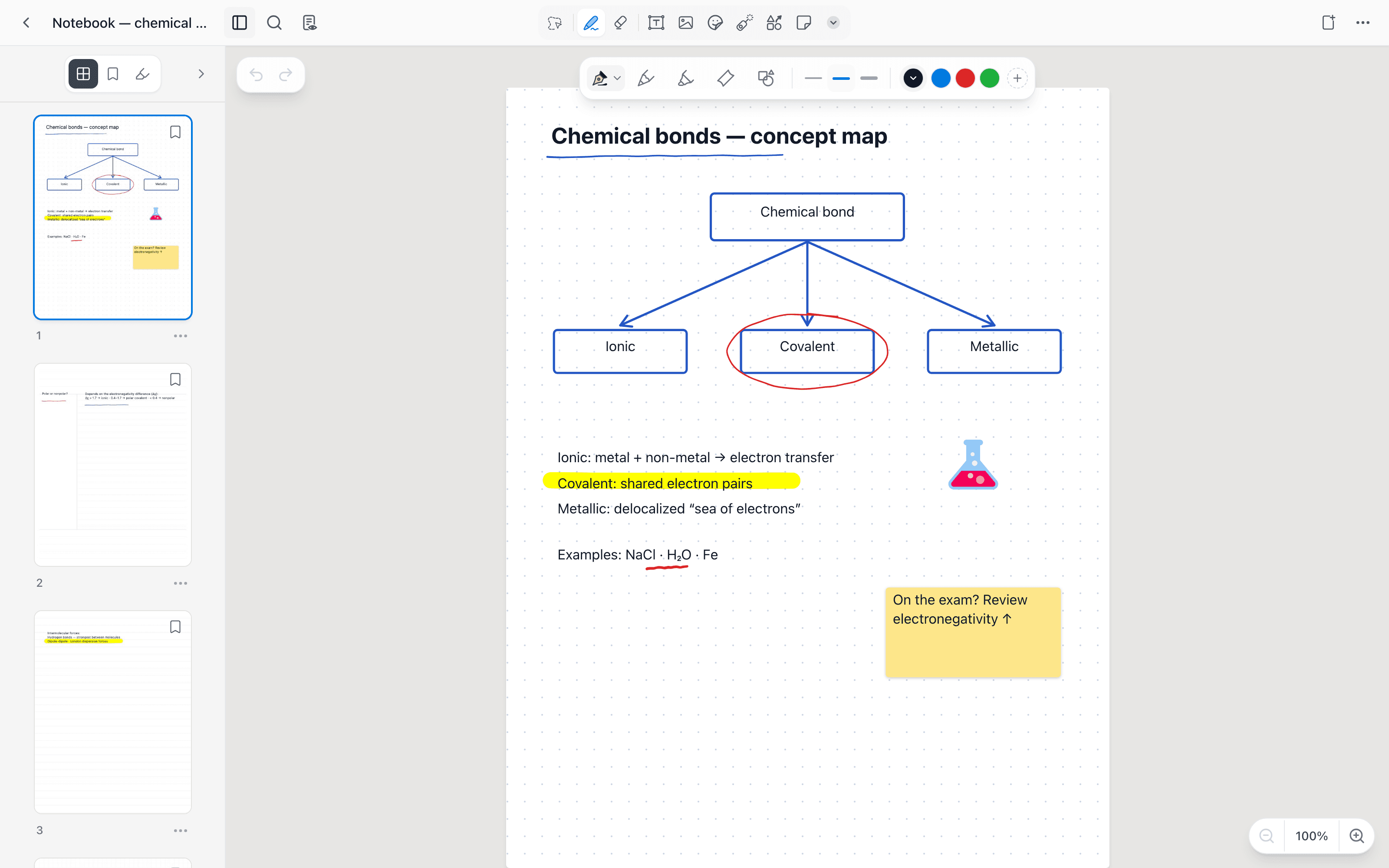
Notes that quiz you back
A semester of beautiful handwritten pages is an archive, not a study plan. In Mento, notebook pages live next to typed notes and PDFs, and any of it can become flashcards — so the effort you put into writing turns into scheduled review instead of a scroll through old pages the night before.
How studying works →One library, actually searchable
Binders and dividers organize what you already know is there. Mento adds the other direction: spaces, topics, tags and search across everything — typed, inked and PDF — so the diagram from week 3 shows up when you need it in week 12.
PDFs in Mento →From pages to exam day
Neither Goodnotes nor Notability has an answer for the week before the exam. Mento does: spaced repetition keeps the material warm all term, a dated exam topic aims it, and timed, scored practice tests rehearse the real thing.
All the study modes →Cost
Compare the cost
GoodnotesNotabilityUS prices as of September 2026. The notebook apps look cheaper — but they do one job, and their sync rides your iCloud storage, so the one-time license isn't the whole bill.
Fair is fair
When the notebook apps are the better choice
Both are superb at what they set out to do. Credit where due:
- →Notability's synced audio replay is genuinely unmatched — if you study by re-listening at the stroke, that's the app
- →Goodnotes' pen customization and stationery ecosystem — nib settings, planners, covers, imported templates — go deeper than a study app will ever chase
- →A decade of muscle memory counts: if your whole workflow already lives in one of them and review isn't the goal, switching buys you little
- →If you only ever annotate and never review, a dedicated annotation app is the simpler tool
Making the move
Bringing your notebooks along
Your existing notebooks aren't stranded — both apps export clean PDFs, and PDFs are a first-class citizen in Mento.
01
Export as PDF
Export your Goodnotes or Notability notebooks as PDFs — both apps do this well — and upload them to your Mento library.
02
Make them studyable
Highlight the pages and generate cards from them, the same as any reading. Old notebooks become review material instead of archives.
03
Write new notes in Mento
Start the new term in Mento's notebook, where pages live next to your typed notes and feed the same study schedule.
Honestly: the PDF route preserves your pages, not editable ink — old notebooks arrive as documents, and new ink starts fresh in Mento. Everything you make here exports on every plan.
FAQ
Goodnotes vs Notability, asked directly
So which is actually better, Goodnotes or Notability?
For notebook organization, templates and pricing flexibility: Goodnotes. For lecture audio synced to your handwriting: Notability. That's been the honest answer for years — the newer question is whether your notes should also study you, which is where Mento comes in.
Does Mento support Apple Pencil?
Yes — the notebook is a full ink surface: pressure-sensitive pens, a highlighter that snaps straight across a line in one stroke, shapes, a lasso, stickies and page templates, with handwriting living alongside your typed notes and PDFs.
Is Goodnotes' one-time purchase really one-time?
The license is — the storage isn't. On Apple devices your notebooks sync through iCloud, so a growing library eventually means paid iCloud+ tiers on top. Notability syncs the same way. Mento's plans include storage.
Can I import my Goodnotes or Notability notebooks?
Via PDF export, yes — both apps export notebooks as PDFs, which upload straight into Mento's library where you can highlight them and generate cards. Editable ink doesn't transfer.
Does Mento record audio like Notability?
Mento has voice notes and lecture recording with AI summaries and action items — but not Notability's audio-synced-to-stroke playback. If that specific feature is your workflow, Notability keeps that crown.
Do Goodnotes' flashcards replace a study app?
Goodnotes 6 added flashcard pages with basic review — handy for light use. There's no card generation from your notes, no study modes beyond review, and no exam-oriented scheduling; for a real exam load it's a feature, not a system.
Does Mento work outside the Apple ecosystem?
Yes — web, iPhone and Android with one account. Goodnotes has expanded beyond Apple too; Notability remains Apple-first.
What does Mento cost?
Free to start. Pro is $14.99 a month or $95.99 a year; verified students pay $8.99 a month or $59.99 a year.
Keep comparing
More comparisons


Handwriting that studies you back
Ink, PDFs, cards and practice tests — free to start, no credit card.